How to Create an FPL Mini-League (2026/27 Step-by-Step Guide)
Create an FPL mini-league in under two minutes. Step-by-step instructions for the Fantasy Premier League website and app, plus league codes, Classic versus Head-to-Head, and the settings you cannot change later.
By Shashwat Nandan · · 9 min read · Updated
How do you create an FPL mini-league?
Sign in to fantasy.premierleague.com, open the Leagues & Cups tab, and select Create a league. Choose Classic or Head-to-Head scoring, name the league, pick the Gameweek it starts scoring from, and click Create. FPL then generates a unique invite code you can share with your friends. The whole process takes about two minutes.
The steps are quick, but some choices stay with you until the end of the season. It is worth understanding what each setting does before you create the league.
The GW1 deadline for 2026/27 is Friday 21 August 2026 at 18:30 BST (17:30 UTC). You can create a mini-league after that. Leagues can be created at any point in the season, but anyone joining later will only score from the Gameweek the league is set to start from.
How to create an FPL mini-league on the website
The web version gives you every setting. If you care about the format of your league, do the setup here and use the app for everything afterwards.
Sign in at fantasy.premierleague.com. You need a squad before you can create a league. If you have not picked a team yet, do that first. The league options stay locked until you have an entry.
Open the Leagues & Cups tab. It sits in the main navigation alongside My Team, Transfers and Fixtures. You will see your existing leagues, plus the global leagues you were entered into automatically.
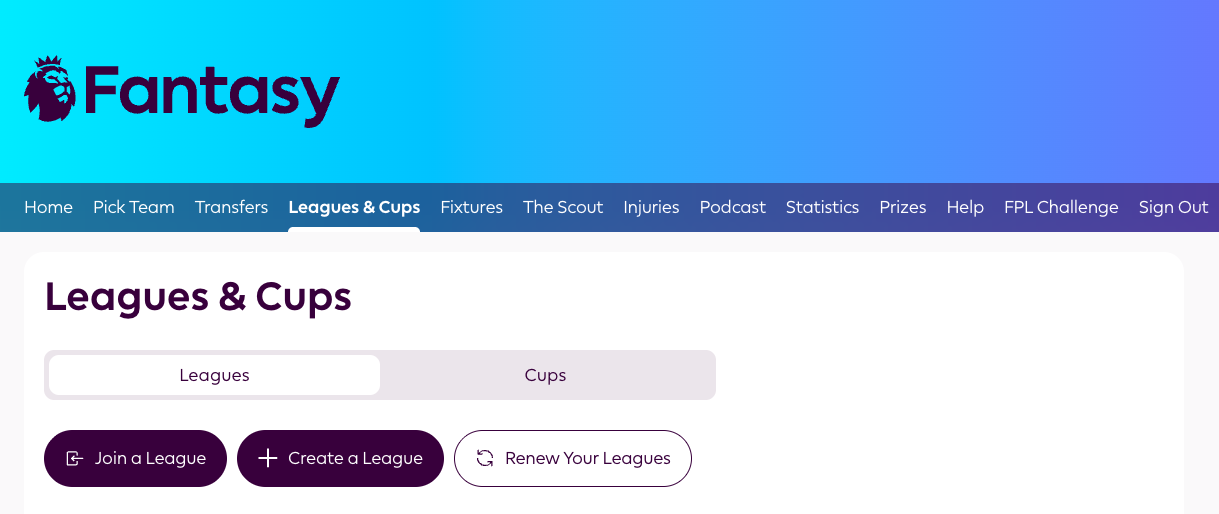
Screenshot source: Fantasy Premier League website. Fantasy Premier League is operated by the Premier League. My FPL Mini-League is not affiliated with or endorsed by the Premier League.
Select Create a league. FPL offers a Create a League & Cup option. This creates your mini-league and attaches a randomly drawn knockout cup to it. Leave the cup on unless you have a reason not to; it costs nothing and gives the league a second thing to talk about.
Choose Classic or Head-to-Head scoring. Classic ranks everyone by total points over the season. Head-to-Head pairs you against one opponent each Gameweek, with three points for a win and one for a draw. More on which to pick below.
Name the league. This is the one field everyone rushes and everyone regrets. It appears in every screenshot, WhatsApp share and league table for the next nine months.
Set the starting Gameweek. A dropdown lets you choose which Gameweek the league begins scoring from. It defaults to the next available Gameweek. Choosing a later one, Gameweek 21 for example, is how you run a half-season or second-chance league.
Set Head-to-Head options, if applicable. For Head-to-Head leagues, you also pick a maximum number of teams and whether to add an end-of-season knockout stage. Check the limits shown in the FPL interface, as they may change.
Click Create. The league exists immediately.
Open Options → Invite Friends and copy the code. FPL generates a unique alphanumeric code. Anyone with that code can join by going to Leagues & Cups → Join a league → Invitational and pasting it in. Share it however your group actually talks: WhatsApp, Discord, a work Slack channel or a group chat.
How to create an FPL mini-league on the mobile app
The official Fantasy Premier League app follows the same path with different labels:
Open the app and tap Leagues in the bottom navigation.
Tap Create and join or the + icon, depending on your version.
Tap Create a league.
Pick Classic or Head-to-Head, enter the name and set the starting Gameweek.
Tap Create, then tap the league and use Invite to copy or share the code straight into a chat.
The app is faster for sharing because it hooks into your phone's native share sheet, but the website may expose more of the Head-to-Head settings. Create it on the website, then share it on mobile.
Classic or Head-to-Head: which should you pick?
Pick Classic unless your league has fewer than about ten people and everyone is competitive. Classic ranks by cumulative points, so it is easy to understand, it scales to any number of managers, and nobody is knocked out. Head-to-Head is more dramatic week to week, but with more than sixteen managers the fixture list gets unwieldy.
Classic scoring is the default for a reason. There is no limit on the number of teams in a Classic private league, standings update after every Gameweek, and a manager who joins in November is simply behind, not excluded.
Head-to-Head scoring turns each Gameweek into a fixture. Three points are awarded for a win, one for a draw and none for a loss. If you have an odd number of managers, FPL adds an average team that scores the Gameweek average, so nobody sits out. A manager can top the Head-to-Head table while scoring fewer total points than someone below them. That is either the charm or the flaw, depending on your group.
The honest recommendation for a group of friends, a workplace or a family league is Classic. Head-to-Head suits a small, fixed, deliberately competitive set of managers who sign up before the deadline.
The settings you can change later
That sixty-second setup locks in several critical choices. Some are set in stone for the season, and others are a headache to fix once the campaign is underway.
The scoring format is final. There is no switch to toggle between Classic and Head-to-Head once the league is live. If you pick the wrong one, you have to create a new league, generate a fresh code and ask everyone to join again.
The starting Gameweek cannot be altered. Set it to Gameweek 1 and latecomers in Gameweek 9 bring their entire season score with them, often ending the competition before they even start. If you choose Gameweek 9, FPL wipes the slate clean for everyone on that date. Both work, provided you choose with intent.
Head-to-Head entry limits are essentially frozen once the opening fixtures are generated.
Renaming is possible but carries social friction. Once the season kicks off, that initial name is already embedded in every group-chat screenshot and league table update.
How does the league code work?
Every mini-league gets a unique invite code at creation, visible under Options → Invite Friends on the website or Invite on mobile. It is not secret in any technical sense; anyone who has it can join, so treat a code posted publicly as an open invitation.
The code and the league ID are different things. The invite code is what people paste to join. The league ID is the number in the league's URL, such as
.../leagues/1234567/standings/c, and is what third-party tools ask for when you connect a league.Managers can join up to 30 private leagues and up to five public leagues. That gives you plenty of headroom for a work league, a family league and a group-chat league running at once.
Codes do not expire mid-season. People can keep joining a Classic league through to Gameweek 38, but they score from whichever Gameweek the league starts from.
You can reuse last season's league. Rather than creating from scratch, the Leagues & Cups screen offers a renew option that carries the same group into the new season with a fresh code.
What to do in the first week before anyone loses interest?
Creating the league is the easy part. Two patterns show up over and over in mini-leagues that stay alive:
Agree the rules before Gameweek 1, in writing. Entry fee, what the prizes are, who holds the money, when it gets paid out, and what happens if someone abandons their team in February. Post it in the chat and pin it. Arguments in a mini-league are rarely about points; they are about a rule nobody wrote down in August.
Give the league more than one thing to win. A single overall title means that once someone builds a fifty-point lead, often by the turn of the year, everyone else is playing for nothing. Monthly winners, a best-Gameweek prize, a wooden spoon forfeit and a bench-points booby prize cost nothing to add and give each Gameweek a reason to matter to more than two people. Running those side races by hand is where most league admins quietly give up, which is the problem My FPL Mini-League was built to solve for private Classic leagues. Paste the ID of a supported league, and the parallel races, Gameweek recaps and the who-owes-who ledger run themselves.
Frequently asked questions
How many people can join an FPL mini-league?
There is no limit on the number of teams in a Classic private mini-league, and it can hold a handful of friends or thousands of managers. Head-to-Head leagues are subject to the limits shown when you create them.
Can you create an FPL mini-league after the season has started?
Yes. Mini-leagues can be created at any point in the season. You choose which Gameweek the league starts scoring from, so a league created in October can either count everyone's full-season score to date or start everyone level from the Gameweek you select.
How do I find my FPL league code?
Open the league from the Leagues & Cups tab, select Options, then Invite Friends. The invite code is displayed there and can be copied and shared. On the mobile app, open the league and tap Invite.
What is the difference between the league code and the league ID?
The invite code is the alphanumeric string friends paste to join your league. The league ID is the number in the league's web address and is what third-party trackers and tools ask for when you connect a league. They are not interchangeable.
How many mini-leagues can I join?
You can be in up to 30 private mini-leagues and up to five public leagues at the same time, on top of the global leagues you are entered into automatically.
Can I change my mini-league from Classic to Head-to-Head?
No. Scoring type is fixed at creation. Changing it means creating a new league and asking everyone to join again with the new code, so decide before you click Create.
What happens if my Head-to-Head league has an odd number of managers?
FPL automatically adds an average team that scores the Gameweek average each week, so every manager has a fixture. Beating the average team counts as a normal win.
Is it legal to run an FPL mini-league with money?
We cannot advise on the legality of a money league. Rules about entry fees and prizes vary by country and, in India, by state. The host is responsible for understanding the rules that apply to the league. A non-cash format using coins or badges avoids a money pool entirely.